
 Adrian Bożko
Street address, house number, apartment number, ZIP code, city, and sometimes state—to a banking system, these are all separate data points. To a customer, they’re simply an address.
When a form requires manually filling out each piece of information in a separate field, some of the heavy lifting involved in data structuring is pushed onto the user. This friction is especially noticeable on mobile devices, where every additional field means switching between inputs, scrolling, and facing another potential point of error.
However, this user journey can be designed differently.
Instead of completing each part of the address separately, the customer starts typing into a single field. The system displays matching suggestions, the user selects the correct option, adds an apartment number if needed, and confirms the details. The application can then parse the selected address into the exact components required by the process data model.
As part of a prototyping effort, we built this feature in Eximee using a custom-built CustomComponent. Our goal wasn’t to create yet another vendor-dependent address lookup tool. We wanted to explore how to build a reusable pattern that simplifies the customer journey while giving the bank full control over the data structure, suggestion source, and integration method.
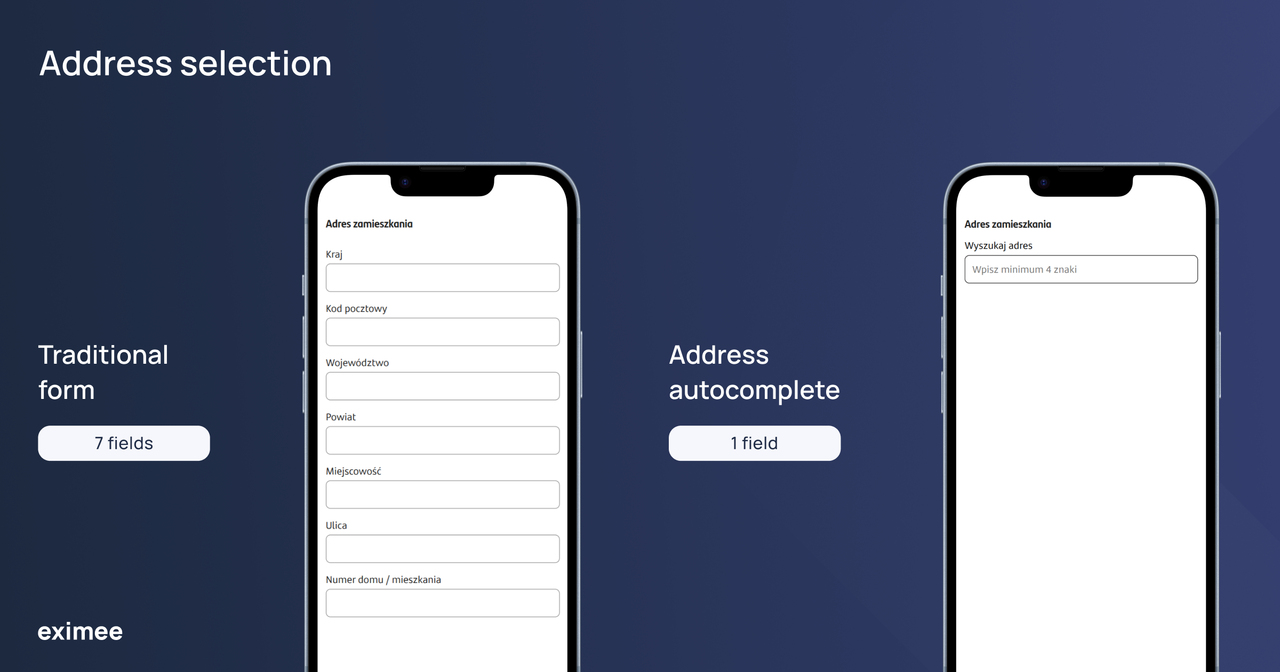
From seven fields to one address search field.
A traditional form makes sense from a system perspective. Systems require the city, street, building number, and ZIP code as separate inputs, so displaying corresponding individual fields feels like the natural approach.
However, that doesn’t mean customers think about their address in the same way.
A process data model defines what information—and in what structure—is needed to execute a workflow. The user interface doesn’t have to mirror that model one-to-one.
In an address autocomplete workflow, the process can look like this:
Apartment numbers are best handled as a separate, explicit step in the workflow, as address databases don’t always contain unit-level data. Depending on project requirements, the component can also be extended to handle apartment or suite numbers entered directly within the initial search query.
From the customer’s perspective, this feels like a single, seamless task. From the application’s perspective, we can still parse distinct values for the city, street, ZIP code, building number, and any other fields required by the workflow and core banking systems.
This distinction is key: simplifying the user interface doesn’t mean compromising or oversimplifying the underlying data model.
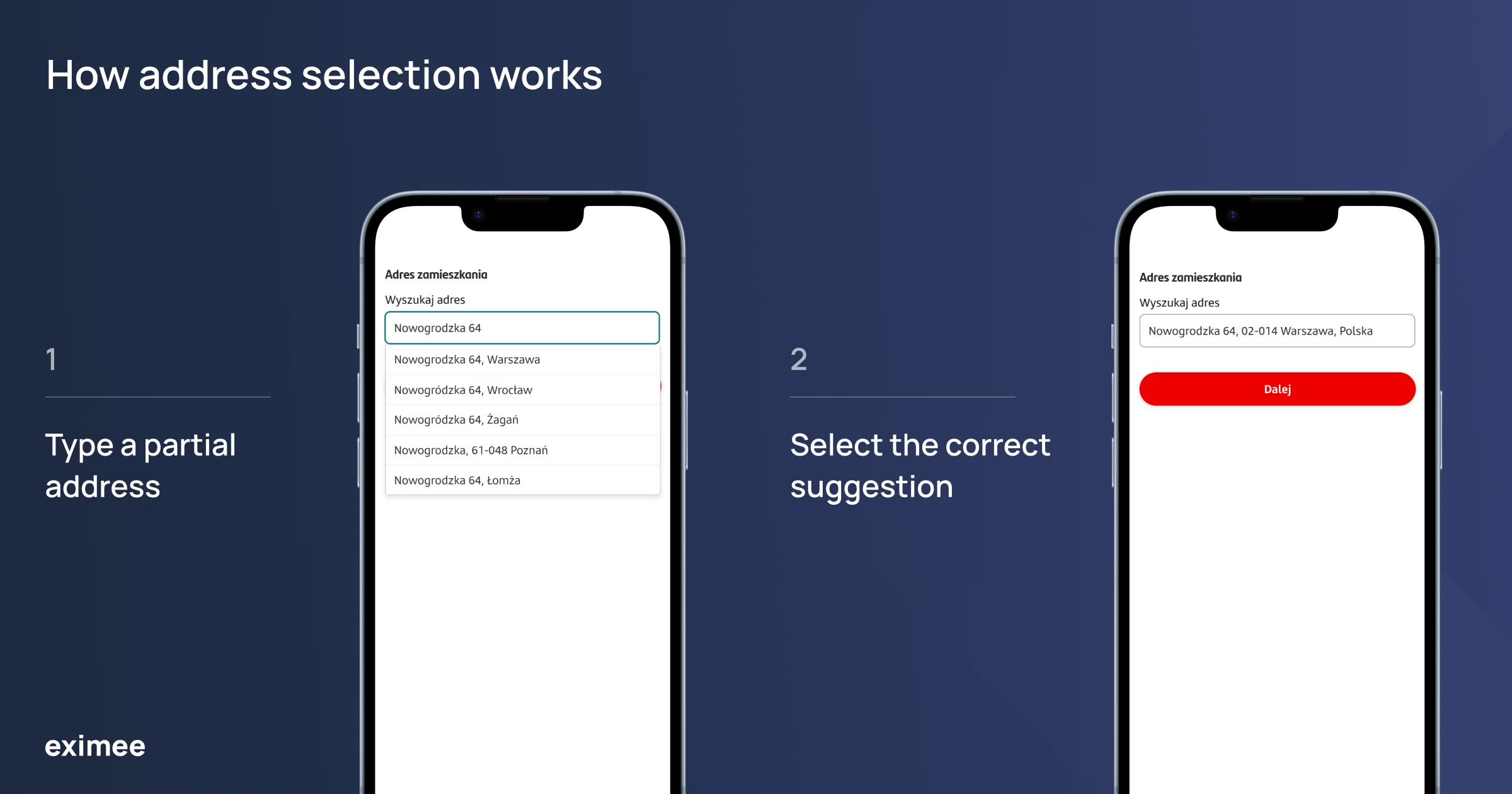
Entering a partial address, selecting a suggestion, and confirming the result.
For the customer, the biggest benefit is minimizing manual effort. Instead of cycling through multiple fields, they can simply start typing their address, select a matching suggestion, and verify the result.
This approach also reduces the risk of simple input errors, such as typos or entering information into the wrong field. This is particularly crucial on smartphones, where an extensive address section can take up a significant portion of the screen.
From the bank’s perspective, the key value lies in maintaining clean, structured data.
Once the address is selected and confirmed, the application can save its individual components within the data model—such as city, street, building number, apartment number, and ZIP code—and seamlessly pass them to subsequent form steps, documents, business rules, CRM systems, or other integrations.
Reusability is another major advantage. The address autocomplete mechanism doesn’t need to be designed and built from scratch for every single form. Once created, the component can be reused across future processes within a given banking deployment, complete with the appropriate configuration and data mapping.
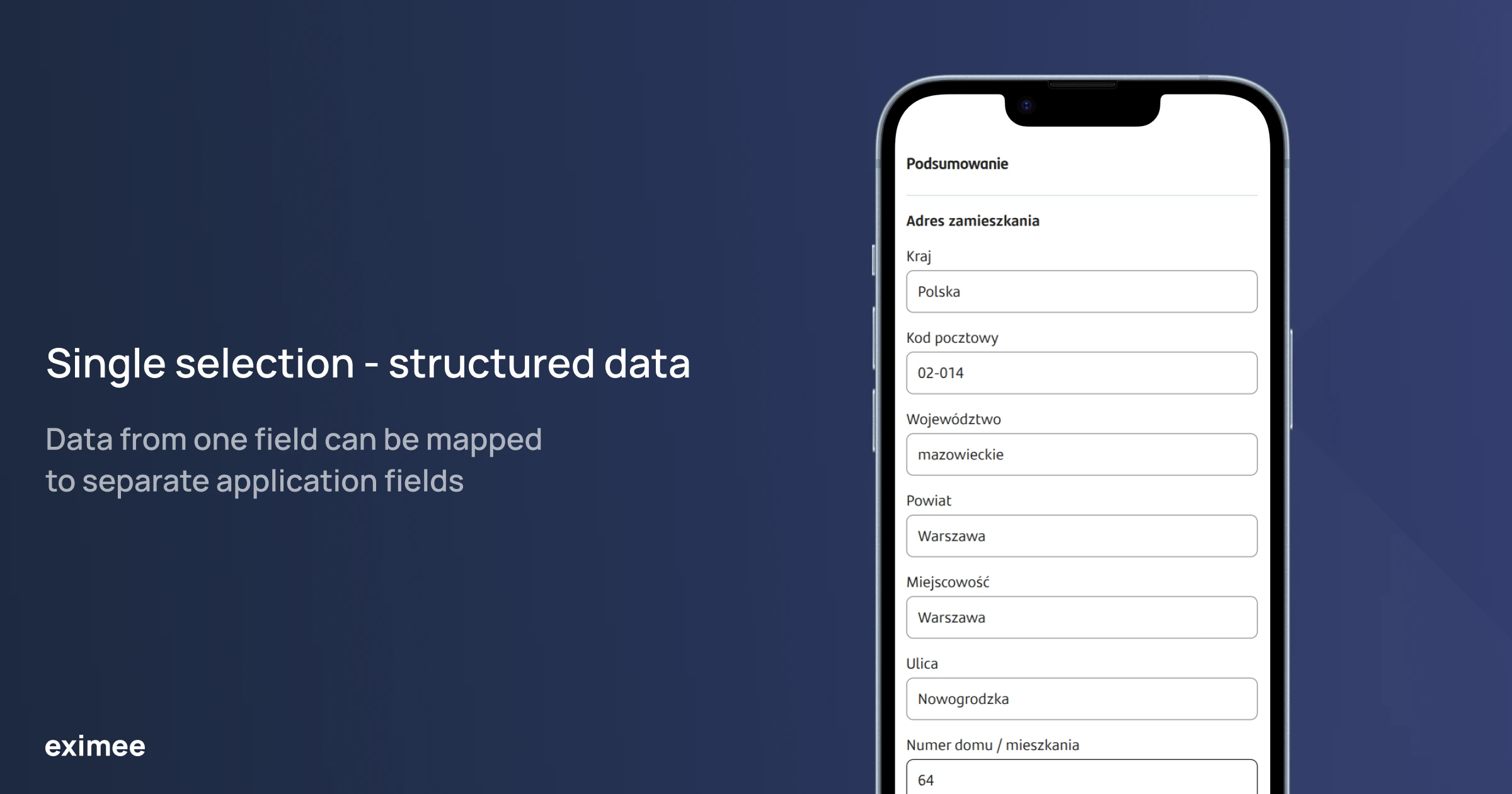
A single selection can populate separate fields in the data model.
CustomComponent is a mechanism that allows you to build custom UI elements within Eximee using JavaScript, HTML, and CSS, and connect them to the data and services used throughout your application.
For the address autocomplete feature, we leveraged this capability to encapsulate the entire search behavior into a single, reusable element.
Low-code doesn’t have to mean no-code—when standard components aren’t quite enough, you can easily extend the application with your own reusable component.
When designing banking forms, it’s best to avoid tightly coupling the user interface to a single address data source. By leveraging a CustomComponent in Eximee, we can decouple how the customer selects an address from how that data is retrieved. This allows the bank to maintain a consistent UX pattern while adapting the integration layer to a third-party service, an internal address index, or an existing banking service—all without having to modify already deployed forms.
Piotr Koliński, Eximee Platform Product Owner at Consdata
For address autocomplete, this means the creator of the next form doesn’t have to build the entire interaction from scratch. They can simply use the ready-made pattern and configure it to meet the specific requirements of their process.
One of the key design principles behind this mechanism was decoupling the user interface from the underlying suggestion source.
Banks often have varying requirements in this area: speed to market might be the top priority for one organization, strict control over data flow for another, and a third might already have its own reference service or address database.
That’s why it’s worth considering at least three distinct models:
| Model | Key advantage | Key considerations |
|---|---|---|
| Third-party address service | Out-of-the-box search and partial-text autocomplete functionality | Cost model, data processing terms, integration and security requirements, data retention and data residency, and evaluation of available providers (e.g., Google, Mapbox) |
| Internal address index | Greater control over data storage, location, and search capabilities | Data updates, index construction and maintenance, search quality, and the need to acquire supplemental data beyond official registries like TERYT (e.g., building and unit numbers) |
| Existing banking service | Leverages data sources and integrations already established within the organization | Data quality, system availability, data scope, and existing API capabilities |
Regardless of the chosen approach, the customer enjoys the exact same address selection experience. Only the underlying data source and integration method change—not the interaction logic itself.
The autocomplete mechanism triggers as the user types, but that doesn’t mean every single keystroke should automatically launch a new query to the data source.
In our prototype, we incorporated search delays (debouncing), a minimum character threshold, and response freshness checks. This ensures that a slower response from an earlier query won’t accidentally overwrite the results for the user’s most recent input.
Parameters like delay duration or the character count required to trigger a search should be treated as configurable settings rather than a one-size-fits-all standard. Fine-tuning them depends on the characteristics of the data source, query costs, and actual user behavior.
Ultimately, the goal of these safeguards is to reduce unnecessary network traffic while keeping the interface smooth and predictable.
If an external service requires authentication, API keys or other credentials should never sit directly within the code executing in the browser.
Communication can be routed through a controlled backend layer instead. This layer can securely store credentials, restrict permitted operations, manage request volume, handle timeouts and errors, and return only the information strictly required for that step to the front end.
However, hiding the API key alone doesn’t resolve privacy concerns.
If a customer’s typed address fragment is transmitted to a third-party vendor, the bank must factor this data flow into its compliance and risk assessments. If sending such data beyond internal infrastructure is unacceptable, relying on an internal data source or an existing banking service remains the best alternative.
Just as crucial is accounting for situations where automated suggestions don’t work as expected.
Not every address will exist in the chosen reference database. Newly constructed buildings, atypical address formats, missing results, or temporary service outages can all happen. In this context, an autocomplete mechanism should simplify the journey, but it must never become a strict prerequisite for completing it.
That’s why users must always have the option to enter or edit their data manually. If a service interruption occurs, the form should gracefully retain any values the user has already typed.
Reducing the number of fields doesn’t automatically make an interface accessible to all users.
A suggestion list is an interactive component. When designing an accessible solution, it’s essential to consider both general accessibility standards and the proper implementation pattern for a combobox element.
In practice, this includes:
Accessibility isn’t an afterthought. It’s a fundamental part of a properly designed customer journey.
A simpler user interface is a great starting point, but only measurement reveals its true impact on the overall workflow.
When implementing an address autocomplete feature, key metrics to monitor include:
Rather than simply assuming that address autocomplete boosts conversion or shortens the journey, tracking these metrics allows a bank to measure real outcomes and iterate based on hard data.
Without this telemetry, it is more accurate to view the approach outlined here as a practical design pattern and a set of takeaways from a prototype, rather than a case study proving a specific business result.
Address autocomplete is just a small part of a banking application, but it perfectly illustrates a broader software design principle.
Customers expect a simple, predictable interface. Banks, on the other hand, need structured data, control over security and integrations, and the flexibility to adapt solutions to their own architecture.
These requirements don’t have to be mutually exclusive.
By leveraging CustomComponent in Eximee, complex UI logic can be encapsulated into a single reusable element and applied across future workflows within a given deployment. Crucially, the method used to fetch address data remains decoupled from the component itself, allowing it to be tailored to any organization’s specific infrastructure.
Ultimately, this does more than just revamp the address section. It establishes a repeatable design pattern that merges a frictionless customer journey with the technical flexibility required in an enterprise banking environment.
How does address autocomplete work in a banking form?
The customer starts typing their address into a single field, and the system displays matching results. Once the correct address is selected, the application can parse the retrieved data into separate data model elements, such as city, street, ZIP code, and building number. Missing details, like an apartment number, can be added separately, and the user should always have the opportunity to edit the data before confirming.
What data sources can be used for address autocomplete?
The mechanism can integrate with a third-party address service, an internal address data index, or an existing banking service. Each model carries different implications for integration, maintenance, costs, and data processing, so the data source should be tailored to the specific organization’s requirements.
What is CustomComponent in Eximee?
CustomComponent is a feature that allows developers to build custom UI elements in Eximee using HTML, CSS, and JavaScript, and connect them to the application’s data and services. This allows more complex interface logic to be built once as a reusable component and deployed across subsequent processes without needing to re-implement it from scratch.
Does selecting an address from the list mean it is fully validated?
Address suggestions shouldn’t be equated with full validation required by a specific banking workflow. While the mechanism helps standardize data entry and minimize simple typos, additional verification may still be required depending on the process requirements, data source, and bank-specific business rules.
How to ensure component accessibility?
An address autocomplete component should support complete keyboard navigation, properly manage focus, and communicate its state to assistive technologies. It should also provide clear messaging for results and errors, appropriate ARIA semantics, and a manual data entry fallback when automated suggestions are unavailable.
Are you looking to identify where a similar approach could reduce customer friction in your own banking workflows? Talk to the Eximee team about leveraging reusable components in your deployment.